
Everpro Chat Open API (1.0.0)
Welcome to Everpro Chat API!
Everpro Chat Open API contains specification for public api provided by Everpro for partners. It describes how to communications between your service and Everpro RESTful Web Service.
The diagram below describes the overview flow of the Everpro Chat Open API. Before accessing the API, partners need to register their account and generate the client secret and client key.

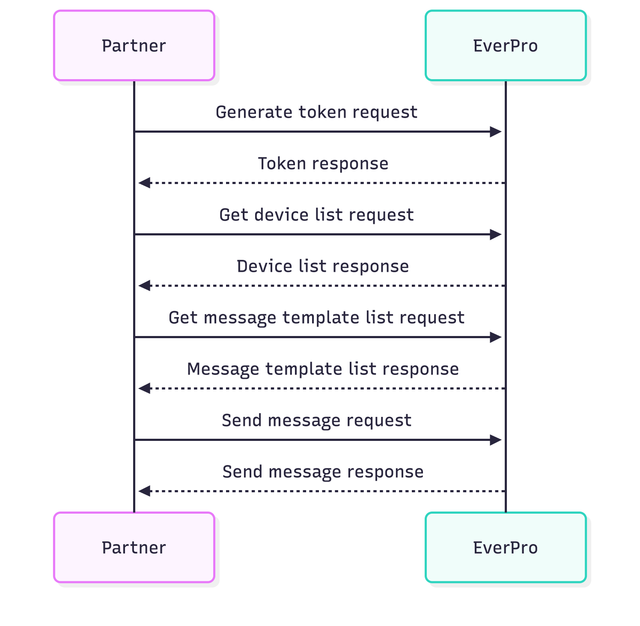
Swim Lane Diagram
The diagram below explains how the interaction flows between the Partner system and the Everpro system to send message with template. Partner can skip the Get Device List and Get Message Template List steps if they already know the device phone number and message template key that will be used to send message.
Limitation
- Rate limit: 1000 requests per minute per IP address
- Token will expire after 24 hours
To keep the partner's system synchronized with events occurring in Everpro Chat, partner can configure a callback URL in the Everpro Chat Dashboard page API/App Integration.
Once configured, Everpro will send HTTP POST requests to partner's callback URL whenever when specific events occur. Currently, the supported events are:
- Broadcast delivery status
- First inbound message
- First reply by agent
- Conversation closed
- Inbound message
- Agent replies
- System event
Please refer to section Callback for more details about the callback data for each event.
Signature
To ensure the authenticity and integrity of callback requests, every callback includes an x-everpro-signature header.
The signature is generated using the HMAC SHA256 algorithm with the raw request body and the partner's callback key.
The callback key can be found in the Everpro Chat Dashboard page API/App Integration once the callback URL is configured.
Signature Formula:
HMAC_SHA256(raw_request_body, callback_key)
We strongly recommend validating the signature before processing any callback request. If the generated signature does not match the value received in the x-everpro-signature header, the request should be rejected.
Signature Validation Example (Golang)
func ValidateSignature(
payload []byte,
secretKey string,
receivedSignature string,
) bool {
    hash := hmac.New(sha256.New, []byte(secretKey))
    hash.Write(payload)

    expectedSignature := hex.EncodeToString(hash.Sum(nil))

    return hmac.Equal(
        []byte(expectedSignature),
        []byte(receivedSignature),
    )
}
Example Usage
func callbackHandler(w http.ResponseWriter, r *http.Request) {
body, err := io.ReadAll(r.Body)
if err != nil {
    http.Error(w, "invalid request body", http.StatusBadRequest)
    return
}

signature := r.Header.Get("x-everpro-signature")

if !ValidateSignature(body, secretKey, signature) {
    http.Error(w, "invalid signature", http.StatusUnauthorized)
    return
}

// Process callback event

w.WriteHeader(http.StatusOK)
}
Data Encryption
The callback payload may contain personal data and other sensitive information. To protect this data during transmission and prevent unauthorized access,
the callback payload is encrypted before being sent to partners. The encrypted payload uses AES-256-GCM, which provides both confidentiality and integrity protection.
The partner is responsible for decrypting the payload using the encryption key. The encryption key can be found in the Everpro Chat Dashboard page API/App Integration once the callback URL is configured.
Callback Payload Structure
Each callback payload contains a set of standard fields that provide information about the callback event.
JSON
{
  "id": "<request id>",
  "user_id": "<user id>",
  "timestamp": "<timestamp>",
  "event": "<event name>",
  "data": {
    "room_id": "<room id>",
    "customer_phone_number": "<customer phone number>",
    "device_phone_number": "<device phone number>",
    ...
  },
  "encrypted_data": "<encrypted data>"
}
Standard Fields
| Field | Type | Description |
|---|---|---|
id |
String | Unique identifier for the callback event. |
user_id |
String | Identifier of the user associated with the event. |
timestamp |
String | The timestamp when the event occurred, in ISO 8601 format. |
event |
String | The name of the callback event. |
data |
Object | The callback data in plain format. This field is deprecated and will be removed in the future. |
encrypted_data |
String | The callback data encrypted using AES-256-GCM. |
Encrypted_data
The encrypted_data field contains the encrypted version of the callback data. After successfully decrypting the encrypted_data field, the resulting payload will follow the data structure defined for the corresponding event.
Please refer to section Callback for more details about the callback data for each event. To support a smooth transition to encrypted callback data, the payload format will be introduced in two phases.
New Callback Events
For new callback events, only `encrypted_data` will be provided. Clients must decrypt and use `encrypted_data` to process these events.
JSON
{
  "id": "<request id>",
  "user_id": "<user id>",
  "timestamp": "<timestamp>",
  "event": "<event name>",
  "encrypted_data": "<encrypted data>"
}
Existing Callback Events
For existing callback events, both data and encrypted_data will initially be provided:
JSON
{
  "id": "<request id>",
  "user_id": "<user id>",
  "timestamp": "<timestamp>",
  "event": "<event name>",
  "data": {
    "room_id": "<room id>",
    "customer_phone_number": "<customer phone number>",
    "device_phone_number": "<device phone number>",
    ...
  },
  "encrypted_data": "<encrypted data>"
}
The plain `data` field will be temporarily maintained for backward compatibility to prevent disruption to existing client integrations. However, partners are expected to migrate to `encrypted_data` as soon as possible. After a transition period, the plain `data` field will no longer be included in callback payloads for existing events.
Data Decryption
The partner must decrypt the encrypted_data field using the AES-256-GCM encryption key provided by our system. The following example demonstrates how to decrypt the payload using Go:
package main

import (
  "crypto/aes"
  "crypto/cipher"
  "crypto/sha256"
  "encoding/base64"
  "errors"
)

// DecryptAES256GCM decrypts a value produced by EncryptAES256GCM.
func DecryptAES256GCM(encryptedData, encryptionKey string) ([]byte, error) {
  key := sha256.Sum256([]byte(encryptionKey))

  block, err := aes.NewCipher(key[:])
  if err != nil {
    return nil, err
  }

  gcm, err := cipher.NewGCM(block)
  if err != nil {
    return nil, err
  }

  data, err := base64.StdEncoding.DecodeString(encryptedData)
  if err != nil {
    return nil, err
  }

  nonceSize := gcm.NonceSize()
  if len(data) < nonceSize {
    return nil, errors.New("ciphertext too short")
  }

  nonce, cipherText := data[:nonceSize], data[nonceSize:]
  decryptedData, err := gcm.Open(nil, nonce, cipherText, nil)
  if err != nil {
    return nil, err
  }

  return decryptedData, nil
}
package main

import (
  "errors"
  "fmt"
)

func main() {
  encryptionKey := "<encryption key>"
  encryptedData := "<encrypted data>"

  // Decrypt
  decryptedData, err := DecryptAES256GCM(encryptedData, encryptionKey)
  if err != nil {
    return
  }

  fmt.Printf("Decrypted Data: %s", string(decryptedData))
}
Response Requirements
Your callback endpoint should return an HTTP 200 OK response after successfully processing the callback request.
Generate token v2
Get Access Token v2
Request Body schema: application/jsonrequired
Request Body
| client_key required | string
|
| client_secret required | string
|
Responses
Request samples
- Payload
- Node + Request
- Shell + Curl
- Shell + Httpie
- Python + Python3
- Php + Curl
- Php + Http1
- Php + Http2
- Go + Native
{- "client_key": "aBcDEaF8ugo4aWFfK6JEMXtK3LNq5BLS",
- "client_secret": "HRDbO8KL99xyyRVymkllku23xtpxU4vl"
}Response samples
- 200
- 400
- 401
- 404
- 500
{- "data": {
- "expires": 86400,
- "token": "eyJhbGciOiJIUzI1NiIsInR5cCI6IkpXVCJ9.eyJtc2lzZG4iOiIiLCJuYW1lIjoiRVZFUk1PUyIsInVzZXJfY2F0ZWdvcnlfaWQiOjIwMCwiZXhwIjoxNjUwMzM1NDg3LCJ",
- "token_type": "Bearer"
}, - "message": "success create/get ...",
- "metadata": null,
- "request_id": "019564e5-8ab3-7bbe-98dc-164750ec045e",
- "status": "success",
- "status_code": 200,
- "timestamp": "2022-04-14T05:55:35.006Z"
}Get Device List
This endpoint returns the list of devices
Authorizations:
query Parameters
| phone_number | string Device phone number |
Responses
Request samples
- Node + Request
- Shell + Curl
- Shell + Httpie
- Python + Python3
- Php + Curl
- Php + Http1
- Php + Http2
- Go + Native
const request = require('request');

const options = {
  method: 'GET',
  url: 'https://client-api-sandbox.everpro.id/chat/v1/device/list',
  qs: {phone_number: 'SOME_STRING_VALUE'},
  headers: {Authorization: 'REPLACE_KEY_VALUE'}
};

request(options, function (error, response, body) {
  if (error) throw new Error(error);

  console.log(body);
});
Response samples
- 200
- 400
- 401
- 404
- 500
{- "data": [
- {
- "device_key": "oyey0yyVR",
- "device_name": "device 1",
- "is_active": true,
- "phone_number": "628100000000",
- "status": "otp_done"
}
], - "message": "success create/get ...",
- "metadata": {
- "page": 0,
- "page_size": 0,
- "total_data": 0,
- "total_page": 0
}, - "request_id": "019564e5-8ab3-7bbe-98dc-164750ec045e",
- "status": "success",
- "status_code": 200,
- "timestamp": "2022-04-14T05:55:35.006Z"
}Get Division List
This endpoint returns the list of chat divisions, including the number of agents per division
Authorizations:
query Parameters
| search | string Filter by division name |
| page | integer Page |
| page_size | integer Page size |
| show_total_agent | boolean Include the total agent count per division |
| is_default | boolean Filter by default division status |
Responses
Request samples
- Node + Request
- Shell + Curl
- Shell + Httpie
- Python + Python3
- Php + Curl
- Php + Http1
- Php + Http2
- Go + Native
const request = require('request');

const options = {
  method: 'GET',
  url: 'https://client-api-sandbox.everpro.id/chat/v1/division',
  qs: {
    search: 'SOME_STRING_VALUE',
    page: 'SOME_INTEGER_VALUE',
    page_size: 'SOME_INTEGER_VALUE',
    show_total_agent: 'SOME_BOOLEAN_VALUE',
    is_default: 'SOME_BOOLEAN_VALUE'
  },
  headers: {Authorization: 'REPLACE_KEY_VALUE'}
};

request(options, function (error, response, body) {
  if (error) throw new Error(error);

  console.log(body);
});
Response samples
- 200
- 400
- 401
- 404
- 500
{- "data": [
- {
- "id": "019564e5-8ab3-7bbe-98dc-164750ec045e",
- "is_default": true,
- "name": "device 1",
- "total_agent": 3
}
], - "message": "success create/get ...",
- "metadata": {
- "page": 0,
- "page_size": 0,
- "total_data": 0,
- "total_page": 0
}, - "request_id": "019564e5-8ab3-7bbe-98dc-164750ec045e",
- "status": "success",
- "status_code": 200,
- "timestamp": "2022-04-14T05:55:35.006Z"
}Get Message Template
This endpoint returns the list of message templates
Authorizations:
query Parameters
| name | string Message template name |
| category | string Message template category |
| status | string Message template status |
| template_key | string Message template key |
| device_phone_number | string Device phone number |
| page | integer Page |
| page_size | integer Page size |
| sort_by | string Sort by |
| sort_direction | string Sort direction |
Responses
Request samples
- Node + Request
- Shell + Curl
- Shell + Httpie
- Python + Python3
- Php + Curl
- Php + Http1
- Php + Http2
- Go + Native
const request = require('request');

const options = {
  method: 'GET',
  url: 'https://client-api-sandbox.everpro.id/chat/v1/message/template',
  qs: {
    name: 'SOME_STRING_VALUE',
    category: 'SOME_STRING_VALUE',
    status: 'SOME_STRING_VALUE',
    template_key: 'SOME_STRING_VALUE',
    device_phone_number: 'SOME_STRING_VALUE',
    page: 'SOME_INTEGER_VALUE',
    page_size: 'SOME_INTEGER_VALUE',
    sort_by: 'SOME_STRING_VALUE',
    sort_direction: 'SOME_STRING_VALUE'
  },
  headers: {Authorization: 'REPLACE_KEY_VALUE'}
};

request(options, function (error, response, body) {
  if (error) throw new Error(error);

  console.log(body);
});
Response samples
- 200
- 400
- 401
- 404
- 500
{- "data": [
- {
- "category": "string",
- "details": [
- {
- "body": {
- "content": "string",
- "mapping_param": {
- "property1": "string",
- "property2": "string"
}, - "param_list": [
- "string"
]
}, - "buttons": [
- {
- "button_icon": "string",
- "index": 0,
- "mapping_param": {
- "property1": "string",
- "property2": "string"
}, - "param_list": [
- "string"
], - "properties": {
- "button_icon": "string",
- "country_code_name": "string",
- "example": [
- "string"
]
}, - "text": "string",
- "type": "string",
- "value": "string"
}
], - "cards": [
- {
- "body": {
- "content": "string",
- "mapping_param": {
- "property1": "string",
- "property2": "string"
}, - "param_list": [
- "string"
]
}, - "buttons": [
- {
- "button_icon": "string",
- "index": 0,
- "mapping_param": {
- "property1": null,
- "property2": null
}, - "param_list": [
- null
], - "properties": {
- "button_icon": null,
- "country_code_name": null,
- "example": [ ]
}, - "text": "string",
- "type": "string",
- "value": "string"
}
], - "header": {
- "content": "string",
- "mapping_param": {
- "property1": "string",
- "property2": "string"
}, - "param_list": [
- "string"
], - "type": "string"
}, - "index": 0
}
], - "footer": {
- "content": "string"
}, - "header": {
- "content": "string",
- "mapping_param": {
- "property1": "string",
- "property2": "string"
}, - "param_list": [
- "string"
], - "type": "string"
}, - "key": "string",
- "language": "string",
- "message_send_ttl_seconds": 0,
- "status": "string",
- "status_reason": "string"
}
], - "devices": [
- {
- "device_key": "oyey0yyVR",
- "device_name": "device 1",
- "is_active": true,
- "phone_number": "628100000000",
- "status": "otp_done"
}
], - "id": "string",
- "meta_created_at": "string",
- "meta_created_by_name": "string",
- "meta_updated_at": "string",
- "meta_updated_by_name": "string",
- "name": "string"
}
], - "message": "success create/get ...",
- "metadata": {
- "page": 0,
- "page_size": 0,
- "total_data": 0,
- "total_page": 0
}, - "request_id": "019564e5-8ab3-7bbe-98dc-164750ec045e",
- "status": "success",
- "status_code": 200,
- "timestamp": "2022-04-14T05:55:35.006Z"
}Sync Message Template
Sync message templates from the provider.
Authorizations:
header Parameters
| X-Request-Id | string <uuid> Request id used for idempotency check |
Request Body schema: application/json
Request Body
| template_name required | string Filter sync to templates matching this name. |
Responses
Request samples
- Payload
- Node + Request
- Shell + Curl
- Shell + Httpie
- Python + Python3
- Php + Curl
- Php + Http1
- Php + Http2
- Go + Native
{- "template_name": "order_confirmation"
}Response samples
- 200
- 400
- 401
- 500
{- "data": null,
- "message": "success create/get ...",
- "metadata": null,
- "request_id": "019564e5-8ab3-7bbe-98dc-164750ec045e",
- "status": "success",
- "status_code": 200,
- "timestamp": "2022-04-14T05:55:35.006Z"
}Send Message with Template
This endpoint sends a message using message template from a specific device to customer's phone number.
Authorizations:
Request Body schema: application/jsonrequired
Request Body
object Template body's parameters mapping
| |
Array of objects Template buttons' parameters, keyed by button index | |
object Template cards' parameters mapping | |
| customer_bsuid | string Receiver BSUID (Meta business-portfolio external customer id) |
| customer_phone_number | string Receiver phone number |
| device_phone_number required | string Sender device phone number |
object Template header's parameters mapping | |
| template_key required | string Message template key |
Responses
Request samples
- Payload
- Node + Request
- Shell + Curl
- Shell + Httpie
- Python + Python3
- Php + Curl
- Php + Http1
- Php + Http2
- Go + Native
{- "body_params": {
- "property1": "string",
- "property2": "string"
}, - "button_params": [
- {
- "index": "0",
- "parameters": [
- {
- "type": "text",
- "value": "chat?filter=yes"
}
]
}
], - "card_params": {
- "property1": {
- "body_params": {
- "property1": "string",
- "property2": "string"
}
}, - "property2": {
- "body_params": {
- "property1": "string",
- "property2": "string"
}
}
}, - "customer_bsuid": "ID.123456",
- "customer_phone_number": "string",
- "device_phone_number": "string",
- "header_params": {
- "property1": "string",
- "property2": "string"
}, - "template_key": "string"
}Response samples
- 200
- 400
- 401
- 404
- 500
{- "message_status_id": "string",
- "reason": {
- "string": "string",
- "valid": true
}, - "status": "string"
}Send Reply Message
This endpoint sends a reply message from a specific device or room to customer's phone number.
Authorizations:
header Parameters
| X-Request-Id | string <uuid> Request id used for idempotency check |
Request Body schema: application/jsonrequired
Request Body
object Audio message content | |
| customer_bsuid | string Receiver BSUID (Meta business-portfolio external customer id) |
| customer_phone_number | string <phone> Receiver phone number |
| device_phone_number | string <phone> Sender device phone number |
object Document message content | |
object Image message content | |
| quoted_message_id | string <uuid> Message id that is being replied to |
| room_id | string <uuid> Room id. Required if device_phone_number and (customer_phone_number or customer_bsuid) are not provided |
object Text message content | |
| type required | string Message type Values: text, audio, document, video, image |
object Video message content |
Responses
Request samples
- Payload
- Node + Request
- Shell + Curl
- Shell + Httpie
- Python + Python3
- Php + Curl
- Php + Http1
- Php + Http2
- Go + Native
{- "customer_bsuid": "ID.123456",
- "customer_phone_number": "6281232323235",
- "device_phone_number": "6281232323233",
- "document": {
- "caption": "Document caption",
- "filename": "document.pdf",
}, - "image": {
- "caption": "Image caption",
- "filename": "image.png",
}, - "quoted_message_id": "c1f1ed8e-d4b9-4e4d-b1c1-04ddab94e26d",
- "room_id": "05451321-18e1-4bfa-aa22-dfd0080cc120",
- "text": {
- "body": "Hello World"
}, - "type": "text",
- "video": {
- "caption": "Video caption",
- "filename": "video.mp4",
}
}
Response samples
- 200
- 400
- 401
- 404
- 500
{- "created_at": "2026-08-10T08:51:22.000Z",
- "customer_conversation_id": "06a71a04-609a-7ede-8000-8423708109be",
- "message_id": "b1d8c9c6-3e2f-4d5a-8b7c-1a2b3c4d5e6f",
- "room_id": "5f391b94-108b-48f2-b145-9cdc23608aa4",
- "session_id": "06a7a7e6-806a-79ed-8000-e625a2fb291f",
- "status": "sending"
}Send Interactive Message
This endpoint sends an interactive message from a specific device or room to customer's phone number.
Authorizations:
header Parameters
| X-Request-Id | string <uuid> Request id used for idempotency check |
Request Body schema: application/jsonrequired
Request Body
required | object Interactive message body |
required | Array of objects [ 1 .. 10 ] items Interactive message buttons |
| customer_bsuid | string Receiver BSUID (Meta business-portfolio external customer id) |
| customer_phone_number | string <phone> Receiver phone number |
| device_phone_number | string <phone> Sender device phone number |
object Interactive message footer | |
object Interactive message header | |
| room_id | string <uuid> Room id. Required if device_phone_number and (customer_phone_number or customer_bsuid) are not provided |
Responses
Request samples
- Payload
- Node + Request
- Shell + Curl
- Shell + Httpie
- Python + Python3
- Php + Curl
- Php + Http1
- Php + Http2
- Go + Native
{- "body": {
- "text": "Body text"
}, - "buttons": [
], - "customer_bsuid": "ID.123456",
- "customer_phone_number": "6281232323235",
- "device_phone_number": "6281232323233",
- "footer": {
- "text": "Footer text"
}, - "header": {
- "text": "Header text",
- "type": "text",
}, - "room_id": "05451321-18e1-4bfa-aa22-dfd0080cc120"
}Response samples
- 200
- 400
- 401
- 404
- 500
{- "created_at": "2026-08-10T08:51:22.000Z",
- "customer_conversation_id": "06a71a04-609a-7ede-8000-8423708109be",
- "message_id": "b1d8c9c6-3e2f-4d5a-8b7c-1a2b3c4d5e6f",
- "room_id": "5f391b94-108b-48f2-b145-9cdc23608aa4",
- "session_id": "06a7a7e6-806a-79ed-8000-e625a2fb291f",
- "status": "sending"
}Assign Room
This endpoint assigns a chat room to a specific division.
Authorizations:
path Parameters
| id required | string <uuid> Room id |
header Parameters
| X-Request-Id | string <uuid> Request id used for idempotency check |
Request Body schema: application/jsonrequired
Request Body
| division_id required | string <uuid> Division id the room should be assigned to |
| reason | string Reason for the assignment |
Responses
Request samples
- Payload
- Node + Request
- Shell + Curl
- Shell + Httpie
- Python + Python3
- Php + Curl
- Php + Http1
- Php + Http2
- Go + Native
{- "division_id": "3d0a8c9e-4f1b-4a6c-9d2e-5f7b8a9c0d1e",
- "reason": "manual reassignment"
}Response samples
- 200
- 400
- 401
- 404
- 500
{- "data": null,
- "message": "success create/get ...",
- "metadata": null,
- "request_id": "019564e5-8ab3-7bbe-98dc-164750ec045e",
- "status": "success",
- "status_code": 200,
- "timestamp": "2022-04-14T05:55:35.006Z"
}Broadcast Delivery Status Callback
Broadcast Delivery Status Callback is a mechanism to let client know when a broadcast message status was updated.
header Parameters
| x-everpro-signature required | string
|
| user-agent required | string
|
Request Body schema: application/jsonrequired
Request Body
| id | string
|
| user_id | string
|
| timestamp | string
|
| event | string
|
object
| |
| encrypted_data | string
|
Responses
Request samples
- Payload
- Node + Request
- Shell + Curl
- Shell + Httpie
- Python + Python3
- Php + Curl
- Php + Http1
- Php + Http2
- Go + Native
{- "id": "5e1c69e4-8458-414d-8680-058fcad6a3cc",
- "user_id": "6aed6767-2b40-4526-bf8b-4221b9bd9b02",
- "timestamp": "2025-10-15T10:30:00.000Z",
- "event": "broadcast_delivery_status",
- "data": {
- "message_status_id": "56b3197c-acef-46f8-9367-79dee74c2a95",
- "broadcast_name": "",
- "customer_phone_number": "6281100000",
- "customer_bsuid": "ID.123456",
- "device_phone_number": "62811989719",
- "customer_conversation_id": "42c3197c-acef-46f8-9367-79dee74c2a95",
- "status": "delivered",
- "message_created_at": "2026-05-12T08:00:00.000Z",
- "message_status_updated_at": "2026-05-12T08:00:00.000Z"
}, - "encrypted_data": "string"
}First Inbound Message Callback
First Inbound Message Callback is a mechanism to let client know when a first inbound or customer initiated message was received.
header Parameters
| x-everpro-signature required | string
|
| user-agent required | string
|
Request Body schema: application/jsonrequired
Request Body
| id | string
|
| user_id | string
|
| timestamp | string
|
| event | string
|
object
| |
| encrypted_data | string
|
Responses
Request samples
- Payload
- Node + Request
- Shell + Curl
- Shell + Httpie
- Python + Python3
- Php + Curl
- Php + Http1
- Php + Http2
- Go + Native
{- "id": "5e1c69e4-8458-414d-8680-058fcad6a3cc",
- "user_id": "6aed6767-2b40-4526-bf8b-4221b9bd9b02",
- "timestamp": "2025-10-15T10:30:00.000Z",
- "event": "first_inbound_message",
- "data": {
- "room_id": "56b3197c-acef-46f8-9367-79dee74c2a95",
- "customer_phone_number": "6281100000",
- "customer_bsuid": "ID.123456",
- "device_phone_number": "62811989719",
- "customer_conversation_id": "42c3197c-acef-46f8-9367-79dee74c2a95",
- "message_id": "a236b376-8522-454f-ae30-039e36b21776",
- "message_created_at": "2026-05-12T08:00:00.000Z"
}, - "encrypted_data": "string"
}First Reply By Agent Callback
First Reply By Agent Callback is a mechanism to let client know when agent replied to a message for the first time in an active conversation.
header Parameters
| x-everpro-signature required | string
|
| user-agent required | string
|
Request Body schema: application/jsonrequired
Request Body
| id | string
|
| user_id | string
|
| timestamp | string
|
| event | string
|
object
| |
| encrypted_data | string
|
Responses
Request samples
- Payload
- Node + Request
- Shell + Curl
- Shell + Httpie
- Python + Python3
- Php + Curl
- Php + Http1
- Php + Http2
- Go + Native
{- "id": "5e1c69e4-8458-414d-8680-058fcad6a3cc",
- "user_id": "6aed6767-2b40-4526-bf8b-4221b9bd9b02",
- "timestamp": "2025-10-15T10:30:00.000Z",
- "event": "first_reply_by_agent",
- "data": {
- "room_id": "56b3197c-acef-46f8-9367-79dee74c2a95",
- "customer_phone_number": "6281100000",
- "customer_bsuid": "ID.123456",
- "device_phone_number": "62811989719",
- "customer_conversation_id": "42c3197c-acef-46f8-9367-79dee74c2a95",
- "message_id": "a236b376-8522-454f-ae30-039e36b21776",
- "actor_name": "Agent 1",
- "actor_role": "agent",
- "replied_at": "2026-05-12T08:00:00.000Z"
}, - "encrypted_data": "string"
}Conversation Closed Callback
Conversation Closed Callback is a mechanism to let client know when conversation is closed.
header Parameters
| x-everpro-signature required | string
|
| user-agent required | string
|
Request Body schema: application/jsonrequired
Request Body
| id | string
|
| user_id | string
|
| timestamp | string
|
| event | string
|
object
| |
| encrypted_data | string
|
Responses
Request samples
- Payload
- Node + Request
- Shell + Curl
- Shell + Httpie
- Python + Python3
- Php + Curl
- Php + Http1
- Php + Http2
- Go + Native
{- "id": "5e1c69e4-8458-414d-8680-058fcad6a3cc",
- "user_id": "6aed6767-2b40-4526-bf8b-4221b9bd9b02",
- "timestamp": "2025-10-15T10:30:00.000Z",
- "event": "conversation_closed",
- "data": {
- "room_id": "56b3197c-acef-46f8-9367-79dee74c2a95",
- "customer_conversation_id": "42c3197c-acef-46f8-9367-79dee74c2a95",
- "customer_phone_number": "6281100000",
- "customer_bsuid": "ID.123456",
- "device_phone_number": "62811989719",
- "notes": "conversation done",
- "closed_at": "2026-05-12T08:00:00.000Z",
- "actor_name": "Agent 1",
- "actor_role": "agent"
}, - "encrypted_data": "string"
}Inbound Message Callback
Inbound Message Callback is a mechanism to let client know when a message from customer was received.
header Parameters
| x-everpro-signature required | string
|
| user-agent required | string
|
Request Body schema: application/jsonrequired
Request Body
| id | string
|
| user_id | string
|
| timestamp | string
|
| event | string
|
| encrypted_data | string
|
object
|
Responses
Request samples
- Payload
- Node + Request
- Shell + Curl
- Shell + Httpie
- Python + Python3
- Php + Curl
- Php + Http1
- Php + Http2
- Go + Native
{- "id": "5e1c69e4-8458-414d-8680-058fcad6a3cc",
- "user_id": "6aed6767-2b40-4526-bf8b-4221b9bd9b02",
- "timestamp": "2025-10-15T10:30:00.000Z",
- "event": "inbound_message",
- "encrypted_data": "string",
- "data": {
- "room_id": "56b3197c-acef-46f8-9367-79dee74c2a95",
- "customer_conversation_id": "42c3197c-acef-46f8-9367-79dee74c2a95",
- "customer_phone_number": "6281100000",
- "customer_bsuid": "ID.123456",
- "device_phone_number": "62811989719",
- "message_id": "a236b376-8522-454f-ae30-039e36b21776",
- "message_created_at": "2026-05-12T08:00:00.000Z",
- "quoted_message_id": "56b3197c-acef-46f8-9367-79dee74c2a95",
- "message_content_type": "image",
- "text_content": "Hello, good morning.",
- "filename": "image.png",
- "reply_data": {
- "type": "button",
- "id": "019f8d07-1435-743b-bb06-5965f798221f",
- "title": "Yes"
}
}
}Agent Replies Callback
Agent Replies Callback is a mechanism to let client know when agent replied to a message in an active conversation.
header Parameters
| x-everpro-signature required | string
|
| user-agent required | string
|
Request Body schema: application/jsonrequired
Request Body
| id | string
|
| user_id | string
|
| timestamp | string
|
| event | string
|
| encrypted_data | string
|
object
|
Responses
Request samples
- Payload
- Node + Request
- Shell + Curl
- Shell + Httpie
- Python + Python3
- Php + Curl
- Php + Http1
- Php + Http2
- Go + Native
{- "id": "5e1c69e4-8458-414d-8680-058fcad6a3cc",
- "user_id": "6aed6767-2b40-4526-bf8b-4221b9bd9b02",
- "timestamp": "2025-10-15T10:30:00.000Z",
- "event": "agent_replies",
- "encrypted_data": "string",
- "data": {
- "room_id": "56b3197c-acef-46f8-9367-79dee74c2a95",
- "customer_conversation_id": "42c3197c-acef-46f8-9367-79dee74c2a95",
- "customer_phone_number": "6281100000",
- "customer_bsuid": "ID.123456",
- "device_phone_number": "62811989719",
- "actor_name": "Agent 1",
- "actor_role": "agent",
- "message_id": "a236b376-8522-454f-ae30-039e36b21776",
- "replied_at": "2026-05-12T08:00:00.000Z",
- "quoted_message_id": "56b3197c-acef-46f8-9367-79dee74c2a95",
- "message_content_type": "image",
- "text_content": "Hello, good morning.",
- "filename": "image.png",
- "template_key": "aBC123xyz",
- "status": "delivered",
- "reason": "insufficient credit"
}
}System Event - Agent Assignment
System Event - Agent Assignment Callback is a mechanism to let client know when agent assignment process (assign, unassign, handover) was occured in an active conversation.
header Parameters
| x-everpro-signature required | string
|
| user-agent required | string
|
Request Body schema: application/jsonrequired
Request Body
| id | string
|
| user_id | string
|
| timestamp | string
|
| event | string
|
| encrypted_data | string
|
object
|
Responses
Request samples
- Payload
- Node + Request
- Shell + Curl
- Shell + Httpie
- Python + Python3
- Php + Curl
- Php + Http1
- Php + Http2
- Go + Native
{- "id": "5e1c69e4-8458-414d-8680-058fcad6a3cc",
- "user_id": "6aed6767-2b40-4526-bf8b-4221b9bd9b02",
- "timestamp": "2025-10-15T10:30:00.000Z",
- "event": "system_event",
- "encrypted_data": "string",
- "data": {
- "room_id": "56b3197c-acef-46f8-9367-79dee74c2a95",
- "customer_conversation_id": "42c3197c-acef-46f8-9367-79dee74c2a95",
- "customer_phone_number": "6281100000",
- "customer_bsuid": "ID.123456",
- "device_phone_number": "62811989719",
- "event_type": "agent_assignment",
- "actor_name": "Agent 1",
- "actor_role": "agent",
- "previous_agent_name": "Agent 1",
- "new_agent_name": "Agent 2",
- "division_name": "Agent 2"
}
}System Event - Message Delivery Status
System Event - Message Delivery Status Callback is a mechanism to let client know when a broadcast message status that created in chatroom or via dashboard was updated.
header Parameters
| x-everpro-signature required | string
|
| user-agent required | string
|
Request Body schema: application/jsonrequired
Request Body
| id | string
|
| user_id | string
|
| timestamp | string
|
| event | string
|
| encrypted_data | string
|
object
|
Responses
Request samples
- Payload
- Node + Request
- Shell + Curl
- Shell + Httpie
- Python + Python3
- Php + Curl
- Php + Http1
- Php + Http2
- Go + Native
{- "id": "5e1c69e4-8458-414d-8680-058fcad6a3cc",
- "user_id": "6aed6767-2b40-4526-bf8b-4221b9bd9b02",
- "timestamp": "2025-10-15T10:30:00.000Z",
- "event": "system_event",
- "encrypted_data": "string",
- "data": {
- "room_id": "56b3197c-acef-46f8-9367-79dee74c2a95",
- "customer_conversation_id": "42c3197c-acef-46f8-9367-79dee74c2a95",
- "customer_phone_number": "6281100000",
- "customer_bsuid": "ID.123456",
- "device_phone_number": "62811989719",
- "event_type": "agent_assignment",
- "actor_name": "Agent 1",
- "actor_role": "agent",
- "message_id": "a236b376-8522-454f-ae30-039e36b21776",
- "meta_created_at": "2026-05-12T08:00:00.000Z",
- "quoted_message_id": "56b3197c-acef-46f8-9367-79dee74c2a95",
- "message_content_type": "image",
- "text_content": "Hello, good morning.",
- "filename": "image.png",
- "template_key": "aBC123xyz",
- "status": "delivered",
- "reason": "insufficient credit"
}
}